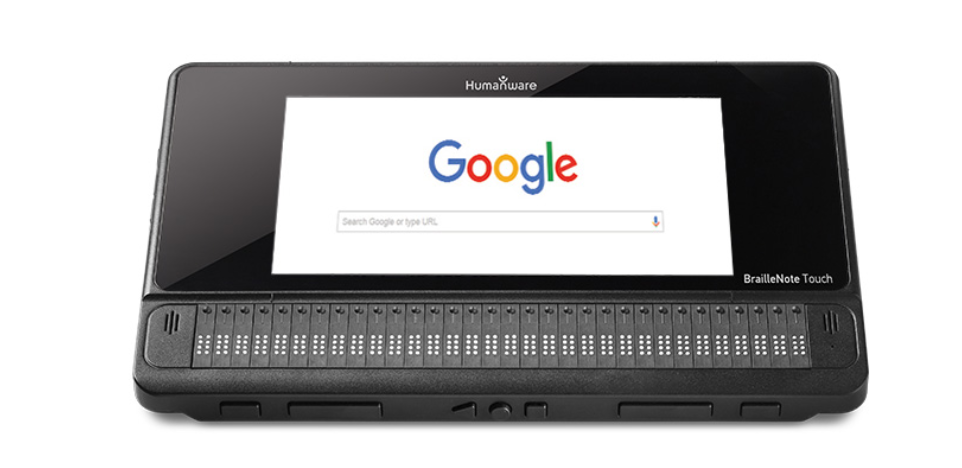
I have been using adaptive technology for reading and writing from a very young age. I used a Perkins Brailler then later on I worked on the BrailleNote. I have had a lot of success with certain technology.
People who are blind can use BrailleNotes and PC computers with adapted software. There is mainly a BrailleNote Touch Plus for people who are blind to use. The other Braille Note that is the BrailleNote Apex has gone out dated so, the BrailleNote Touch Plus is the latest BrailleNote to use. The BrailleNote can get the most done in an effective way, however there are two softwares that do not work with the BrailleNote Touch Plus, they work with a PC 1. These softwares are Duxbury software 2 and OpenBook. People who are blind can also use iPhones with voice over on which will tell you what is on your iPhone screen.
In my opinion the BrailleNote is the most effective because it has no glitches. The PC computer can have more glitches than the BrailleNote. I think that would be expected because the BrailleNote is a third party device whereas the PC is not. If you are reading and/or writing, BrailleNote can be the most effective. This is because you can read the braille as you are working versus on the PC you only have the audio option unless you connect the BrailleNote or Mantis Q40 to the PC. If so, then you will be able to read the work under your fingers with the PC. Therefore, in my opinion, the BrailleNote is the most user friendly for all reading and writing tasks. The PC is the least effective with Google products and I believe you would probably be better to use Microsoft products with the PC, but then the Microsoft products may have their own problems.