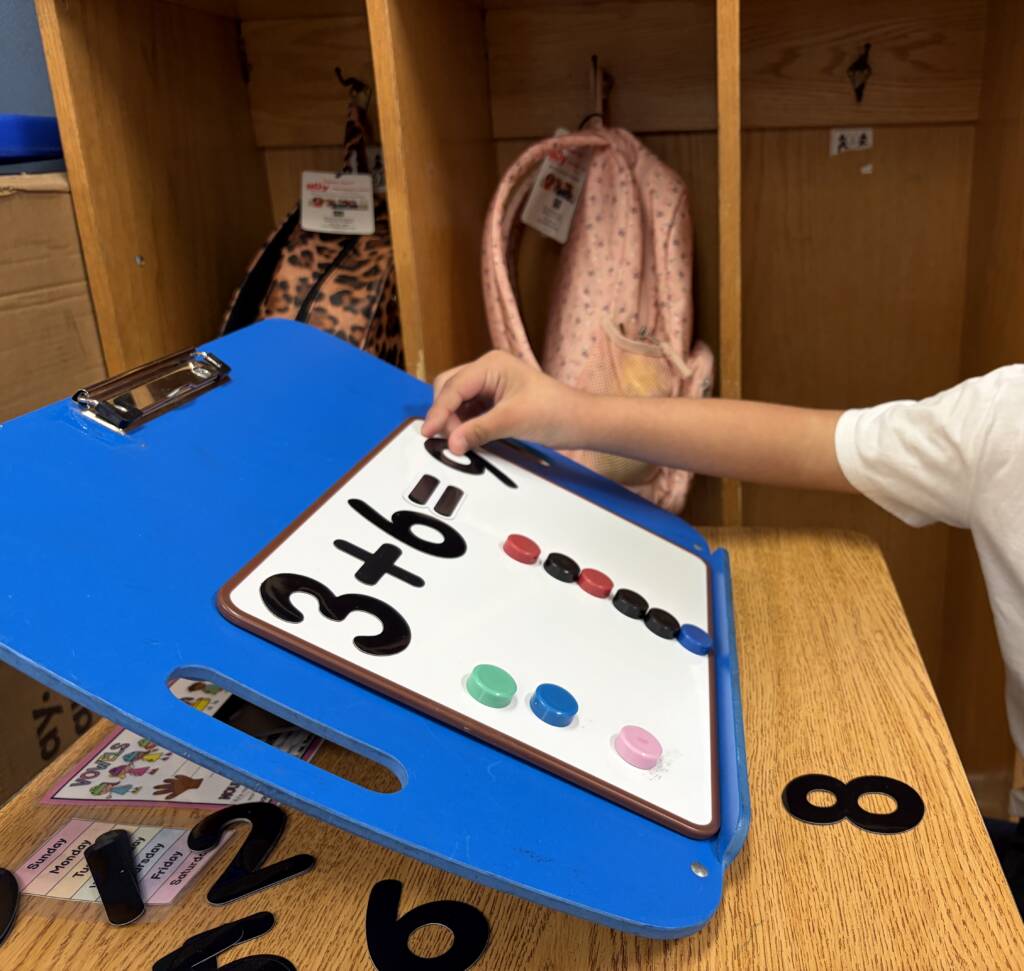

Written by Jenn Seiff and Maggie Roth
Introduction
LJ is an 11th grade student who is a bright, kind, caring, and empathetic young man, who is engaged in his community and wants to ensure everyone is included. He is an intellectually curious young man, who enjoys asking questions and engaging in discussions. LJ has previous diagnoses of cerebral palsy and cerebral/cortical vision impairment. LJ uses a wheelchair for mobility and uses an augmentative and alternative communication (AAC) device for communication.
Strengths and needs
LJ is humorous and loves to make others smile and laugh. He is also quite confident, persistent, and resilient. LJ works super hard to be able to do the same things his peers do. The disabilities/access needs that affect his academic participation are physical challenges, gross motor and fine motor (only use of his left hand), communication and vision.
To reduce visual clutter when learning and taking assessments, LJ requires that questions are presented one at a time as well as there being a reduction of extraneous information/visual clutter on the page. The team was prompted to approach school academics differently because as the complexity of academics increases with each coming year, it is more fatiguing as well as challenging for LJ to both access and prove his knowledge.
The overarching goal: access, participation, learning, and increasing independence
Our mission as his parents
The goal was not simply to modify assignments for our son, but to find ways for him to meaningfully access the same academic concepts, participate in the learning process, and gradually develop tools that would allow him to work more independently.
As a member of the team, we are striving to help LJ long term as he transitions from high school to college. The team is not working only on individual assignments, but finding tools that he can use during college, and in the workforce. I modify or adapt activities, assignments, and tests for different classes. I have also realized that it is very important to help LJ become independent because as he gets older, there may not be someone there to help get different materials out for him to study. This past school year, and moving forward I have been able to modify Boom Cards for LJ. We have been able to use them to reiterate instruction or the notes from class. LJ is able to access Boom Cards independently.
We want to share processes and tools that may be useful to other students, families, educators, and professionals.
A powerful philosophy: The team adapts the environment and tools around LJ rather than expecting him to overcome inaccessible materials alone.
Meet the team
A multidisciplinary approach is one of the most important aspects for our success.
LJ is the center. He is a paramount member of the team and not just a recipient of everyone else’s work.
Team members
LJ Seiff/Student
Role: Primary learner and collaborator (he likes to think he’s my boss 😊)
Primary contribution: Provides feedback, makes choices, develops independence, successfully passed the state standardized Algebra I test, taking Algebra II this year
Special education teacher/case carrier (Mr. Moore)
Role: Coordinates IEP and instruction; submits application for testing accommodations to the Virginia State Department of Education for LJ’s needs
Primary Contribution: Ensures accommodations and goals are integrated
Teacher of students with visual impairments (Ms. Roth)
Role: Visual access
Primary contribution: Determines/implements strategies for visual accessibility; provides LJ with the AAC motor pathways for new content-specific vocabulary (this is done through the use of google slides delivered to LJ however the team has a master Google Slide with all 11th grade subject specific vocabulary and how to find the terms on the AAC).
Assistive technology specialist (Ms. Alexander)
Role: Coordinates assessments, all assistive technology and tools, and helps team understand how to implement
Primary contribution: Ensures accommodations and goals are integrated
Literacy tutor (Ms. Abby)
Role: Literacy instruction
Primary contribution: Supports reading/writing access and skill development
Algebra tutor (Ms. Michelle)
Role: Mathematics instruction, instructional tools, and helps determine how best to program AAC device for LJ to be able to dictate to a scribe how to solve algebraic problems
Primary Contribution: Develops accessible ways to represent mathematical concepts and for LJ to independently graph and/or solve problems
Parents (Jenn and Josh Seiff)
Role: Advocacy, continuity, problem-solving
Primary contribution: Help identify barriers and support generalization
Web designer (Matt Kapusta)
Role: Digital accessibility/tool development
Primary contribution: Creates/adapts a one-stop-shop website to be the platform for all of LJ’s algebra digital tools and templates
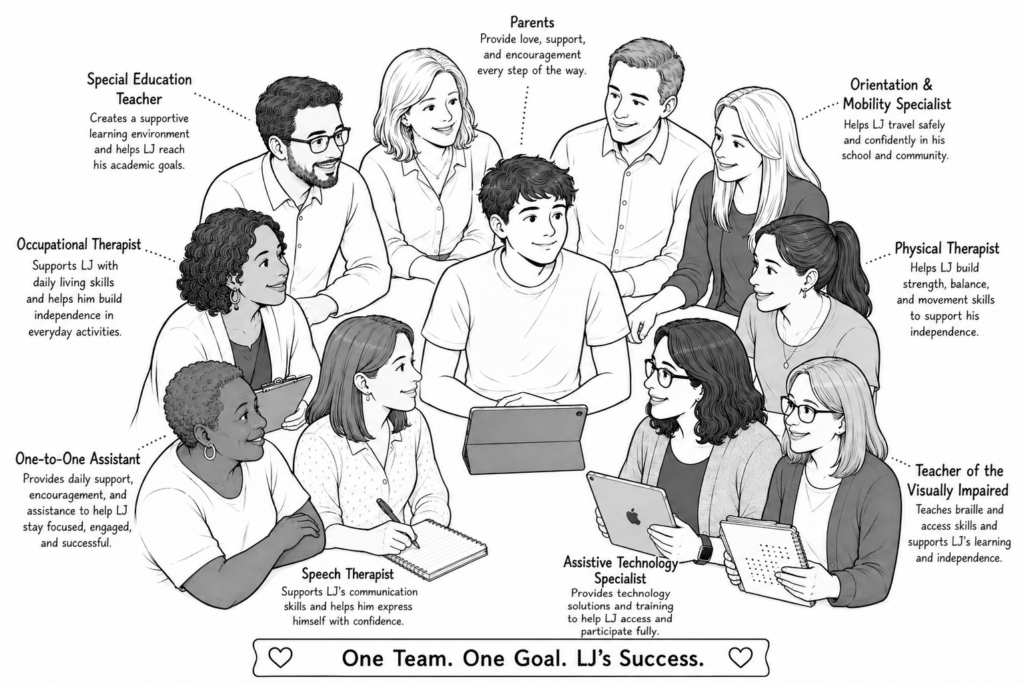
An example of LJ collaboration at the forefront- an email between Ms. Michelle, Mr. Moore, and LJ
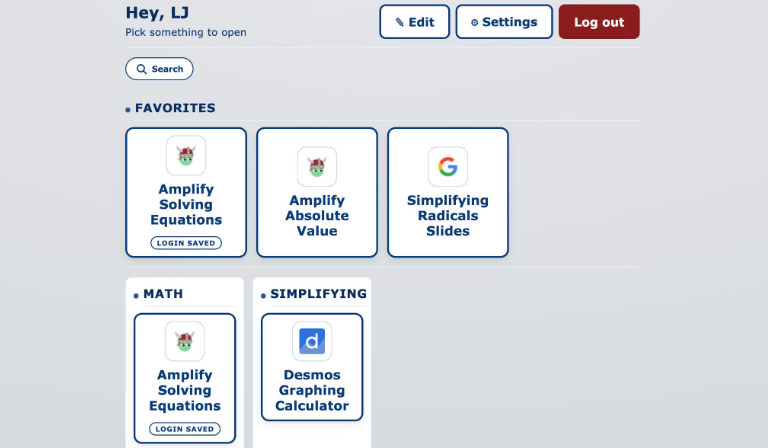
Hi! LJ and I worked on simplifying radicals today.
Some struggles he’s having with the template: he can’t contrast the colors and when there are too many things being multiplied, it’s hard for him to visually see those groups of two.
I had him do some of the assigned problems on Desmos calculator where he could use the inverted colors, and here’s what he did:
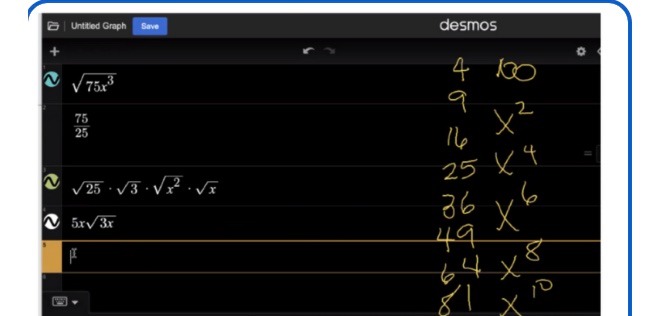
He wanted me to also share that if he could have the problems on paper, then he can do them in Desmos. LJ can chime in if I missed anything!
Barriers
Email from Ms. Michelle (Algebra tutor)
“Hi! I’ve really been thinking a lot about long-term sustainable solutions for LJ to be able to access advanced math curriculum. I’ve done lots of google searching but haven’t found a lot of good solutions (he can’t be the first student to need access to advanced math!). I don’t love how he’s got templates all over the place, some on Google Slides, some on Desmos, etc. I don’t have enough coding experience, but I think it actually wouldn’t be that difficult otherwise put them all in a web-based template. I reached out to my friend who’s a computer engineer and she suggested reaching out to the university, she worked there for years and said students and student groups are encouraged to take on outside projects and thought it’s doable for a student. I’m going to pursue that avenue, but I also thought I’d ask if you had any contacts or connections through FB groups of coders or someone who might be able to help.
Have you and LJ ever looked at Kiwi Write Math? I think its interface is a lot more user friendly than Equatio was.It basically gives you a blank board and a keyboard to click to access math symbols more easily. I also like that the board itself you can click anywhere to have it type in what you want typed. I’m wondering about LJ being able to click the numbers (or are they too small), or if there’s a way for his device to talk to it better than Equatio?”
Mom’s Reply: Just an update
- We noodled around with the Kiwi Write Math site and have a 30-day trial right now. LJ is not a huge fan so far. We will keep working at it. He first tried typing from his laptop which was too laborious. Then he tried via Bluetooth directly from his AAC device.
- I sent the TVI an email asking for the Equatio contact’s info.
- We no longer have access to Equatio so we have asked Mr. Moore for their license info so we can check it out.
- My older son, Nate, is an MIS major in college and is currently in a coding class and when we spoke just now he suggested checking out Linktree because its a great one-stop-shop site for all the places LJ would need to click to get the correct template.
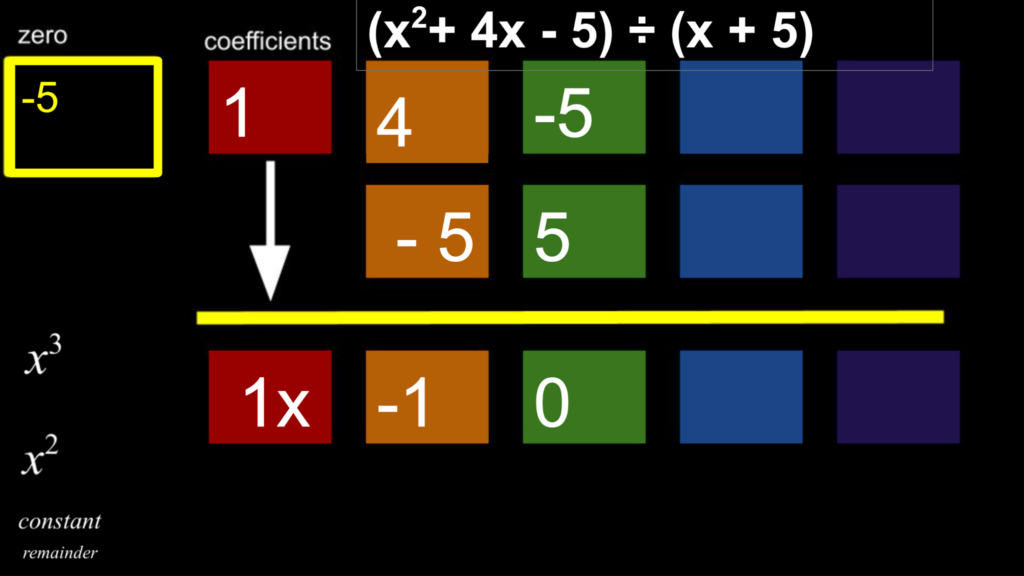
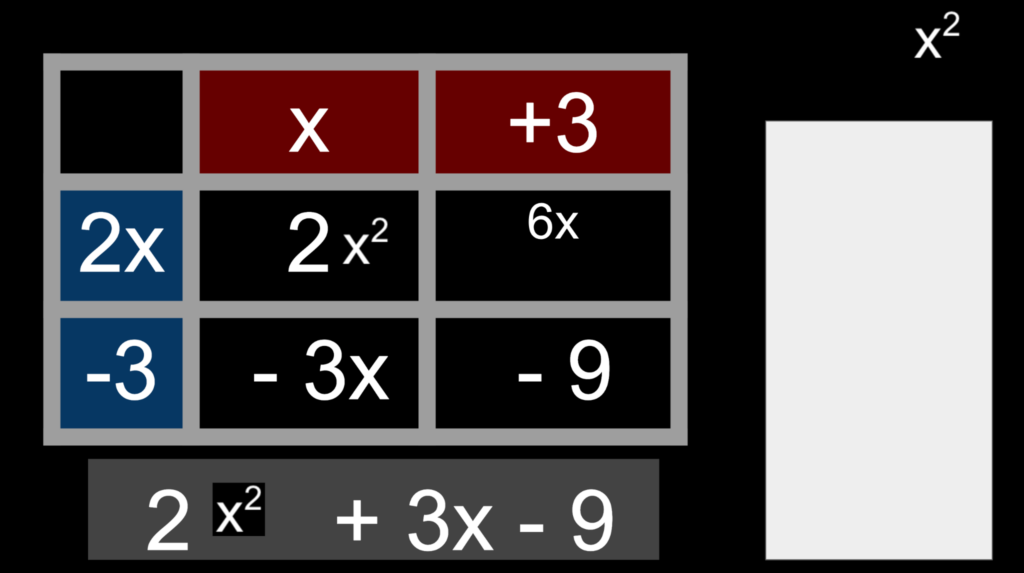
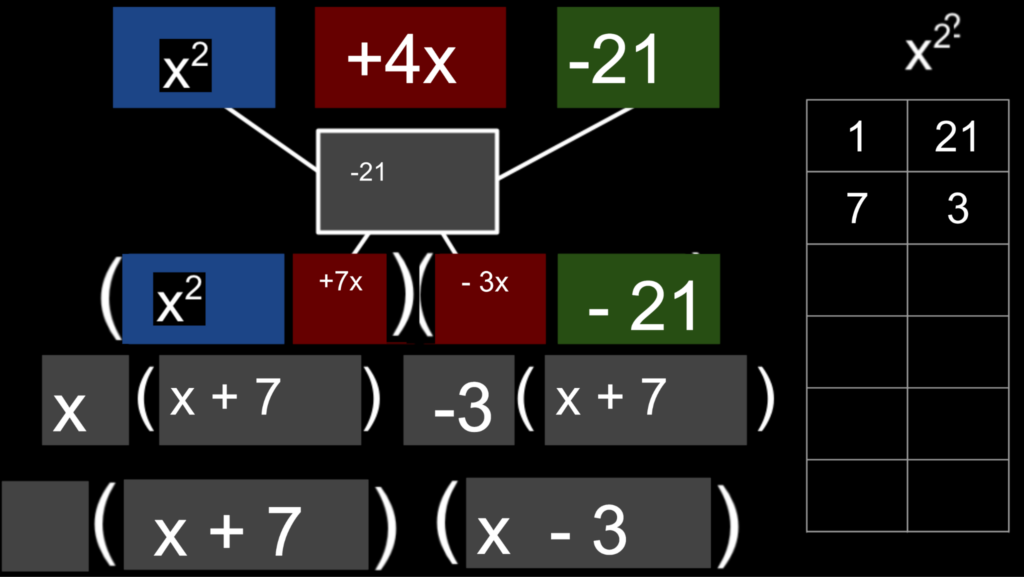
Making Google slides accessible- unadapted slides are too cluttered
Synthetic Division Homework
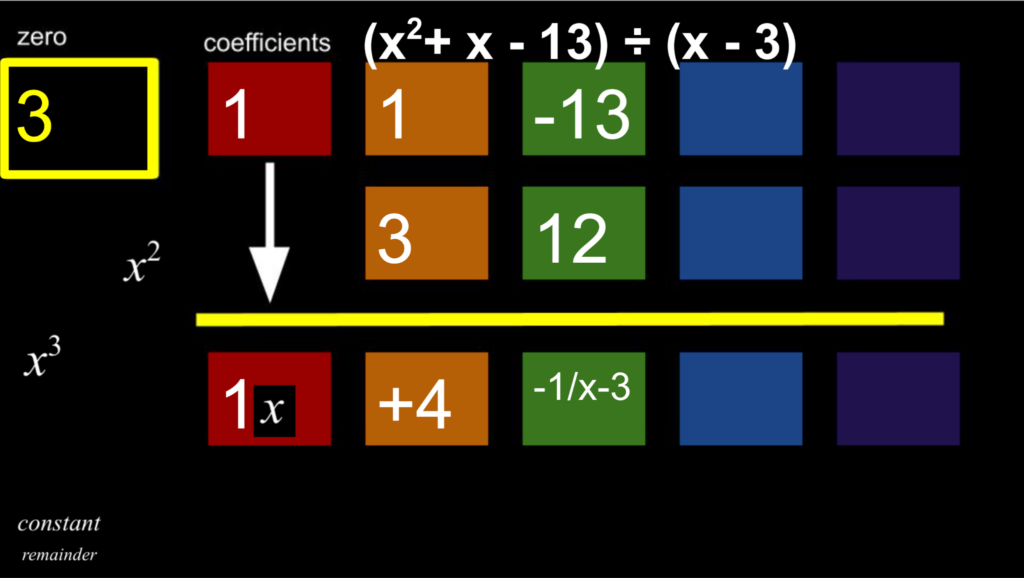
Multiplying Polynomials (white box to manipulate by dragging and covering up places).

Factoring
Team collaboration
Who contributed?
- Special education teacher → curriculum expectations and visual access
- TVI → visual access
- Math tutor → verbiage/”tells” to dictate to a scribe/setting up the problem
- Web designer → digital presentation
- Parent → observed what worked at home
- Student → provided feedback
The website
The website is able to recreate the tables that we use on the Amplify templates. It can make a “teacher” page where Ms. Michelle or other teachers can add new table based graphic organizers (templates) if needed. A clear button is used so it can be reused multiple times.
Priorities: math symbols work, can embed a calculator, will work with color contrast
Figure 1. LJ’s website that houses all his “graphic organizers” and calculator

Mathematics: working on an iDroo Board virtually with Ms. Michelle
This could be especially compelling because it demonstrates the process over the summer, not merely the finished answer. Additionally, it allows LJ to go back and refresh his memory. The entire year was saved last year and there are multiple tools that LJ has learned their functions and how to operate them to make this a useful learning tool.

Academic task
The mathematical concept being worked on was graphing vocabulary such as increasing/decreasing, maximum and minimum
Access challenge
LJ’s CVI made the traditional approaches inaccessible. He also does not have the fine motor ability to write with pen or pencil. Everything has to be digital.
Team’s solution
Ms. Michelle utilized the iDroo board because it affords her the ability to use differentiating color on a black background, to either type or hand-draw, to link Amplify (formerly Desmos and what our state of Virginia permits for state testing) graphs directly into LJ’s board and then to write on top of the graphs. Another nice feature is that we have a continuous running log of LJ’s work and how he is progressing with the concepts. He uses two monitors both at home and at school to magnify the images, words, and numbers shown.
Independent solving equations template
It demonstrates the transition from adult supported learning to independent problem solving. Here’s a snippet from the application to Virginia’s DOE for testing accommodations:
Use of Digital Graphic Organizers for instruction and assessments. These organizers allow the student to access algebraic assessments more independently allowing him to solve the given math problem.
Solving equation: This allows the student to show steps to solving an equation as well as a separate space for him to do calculations to minimize going back and forth to the calculator.
Simplifying expressions: A table that makes it easier for the student to type each step of simplifying an expression in himself. I’ve included a space for him to do calculations as well so he doesn’t have to jump back and forth tabs. We also added algebra tiles to this template, but I’m including a link without algebra tiles too if there are situations where you want him to simplify without them.
Adaptation
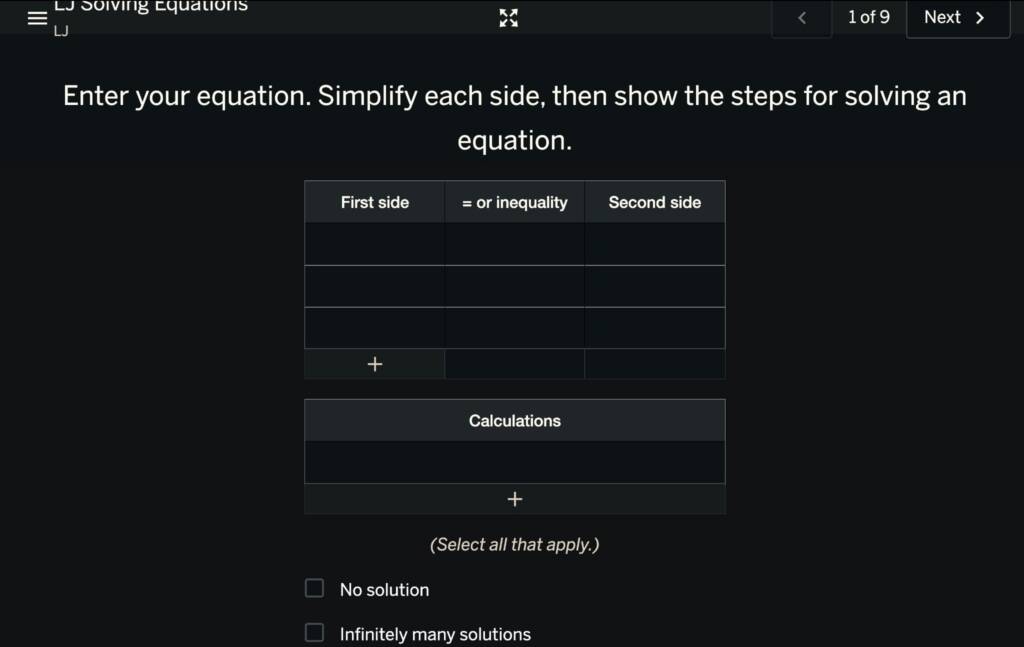
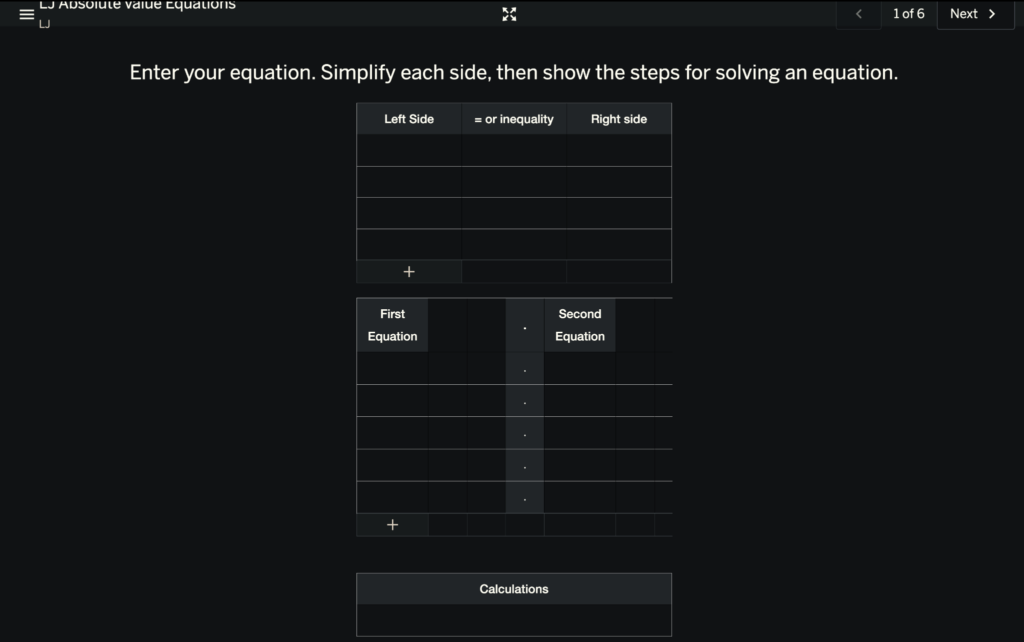
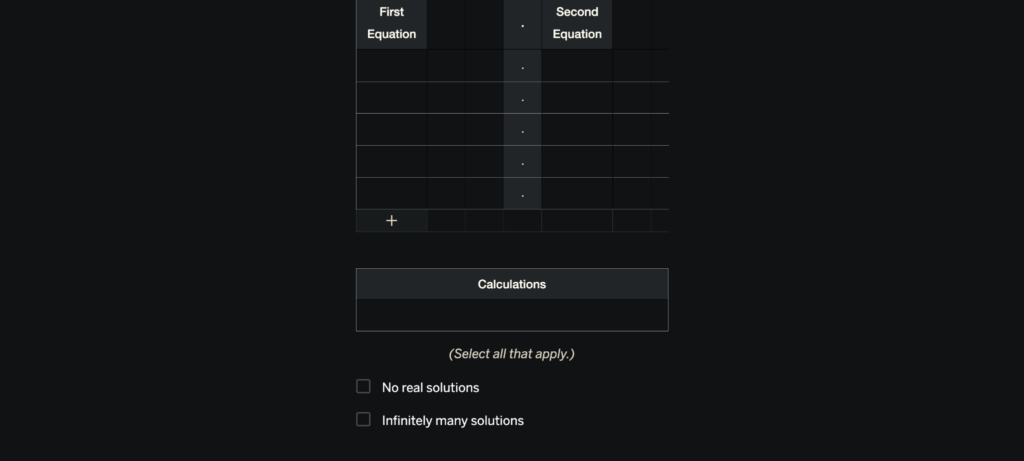
LJ prefers the Dark Reader Google Chrome extension.
Then annotate the image with numbers/arrows:
1. Identify the inequality
2. Isolate the variable
3. Perform operation
4. Check whether the inequality sign changes
5. Record answer
Progression
Beginning
- Ms. Michelle and Mr. Moore model steps
- Verbal prompting
- Adult organizes workspace
Developing
- LJ completes the steps
- Uses the calculator feature for any calculations he doesn’t do mentally or in his head
Increasing Independence
- Student uses template independently
- Minimal prompting
- Student navigates to template
The important question
What did the adaptation make possible that wasn’t possible before?
Literacy and reading access
Speech and language impairments
LJ uses Augmentative Alternative Communication (AAC), specifically a dedicated speech generating device to communicate with direct selection as his access method (left thumb). LJ is unable to use verbal speech to communicate or dictate to a scribe; and the motor impairment necessitates increased time and effort to communicate his answers. The time required to formulate his answers in addition to the time required to make a selection is compounded by having to also take the time to dictate that to a scribe. This results in selection rates having a profound impact on LJ’s communication rate, cognitive load, and fatigue. Given these limitations, implementing the use of graphic digital organizers is critical for the student to independently solve the equation and reduce the energy and effort to communicate every step for each problem. Additionally, the student uses multiple strategies to evaluate which method works best for his energy level. Based on the need, he may rely on using his AAC to dictate to the scribe the steps he would like them to write.
LJ works with Ms. Abby as his literacy tutor. Ms. Abby has been trained by Dr. Karen Erickson. Below is our challenge for this year:
“As LJ continues to progress in school and face the kinds of high stakes tests he is facing this year, it will be important to focus his direct teaching and tutoring time on strategies to support him in passing the assessments. LJ asked Karen Erickson to spend some time talking with him about these upcoming tests. Karen agrees with LJ that the multiple-choice portion of the writing text should be relatively easy – it will require plenty of studying, but it will be easiest for him to navigate. The reading and generative writing tests present different kinds of challenges. It is clear that Virginia allows the use of an AAC device during SOL tests in reading and writing, but the accommodation guidelines indicate that the use of AAC requires all responses to be transcribed.
Given LJs current strategies and others he can learn during the coming year, he may be much more successful if he has control of using his device with a blank word processing page to write and then the resulting text is transcribed from the word processing document to the test form. Though we don’t know if it is allowed, he may also be more successful with access to passages on screen and questions/responses on another. He is at a serious disadvantage with demands to scroll visually and physically between parts of the test. This might require access to a paper version of the text that is displayed on a CCTV or similar device while he interacts with the questions in the online format. These are just ideas we brainstormed while talking at camp. Dr. Erickson is willing to meet with the team to discuss these or other possible accommodations. It would be important to get these accommodations in place early in the school year so that they could be incorporated throughout the year.”
LJ enjoys when Ms. Abby uses the NiftyThriftyFifty as part of their sessions.
LJ’s feedback matters
What did LJ tell/show the team?
Parents have valuable data
Mom has forgotten how to do absolute value equations but LJ can now show her how!
Don’t adapt the student – adapt the access
Read more about LJ:
My Experience as a Student Living with CVI who uses AAC
LJ Seiff on the CVI AAC and the Collective Power of Us