What is an FVA?
As teachers of the visually impaired (TVIs), we provide a comprehensive evaluation to assess students’ visual abilities in terms of how they function in the classroom and in their everyday lives. This functional vision assessment is essential to our profession, as it is crucial for identifying how visual impairments or visual conditions affect a student’s ability to perform tasks. We can then make recommendations to improve functional visual abilities and help students access their world.
Brief overview of the areas of the FVA
- Suggested materials
- History
- Environment
- Structure of the eye
- Near and distance
- Visual fields
- Color
- Ocular motility
- Learning media assessment
- Expanded core curriculum
Link to a virtual binder: This was created to serve as one comprehensive location for all resources specific to each area of the Functional Vision Assessment.
https://www.livebinders.com/b/3581712
What does “FVA on the go” do?
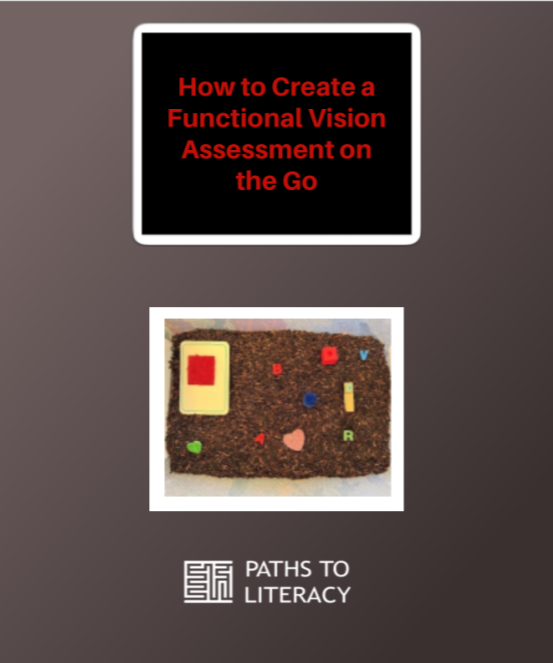
Ease: Provides the TVI or professional with something easy and quick to bring into the classroom or other settings for assessment. This ease also comes from being organized and having a plan for what to do with the student.
Trust: Helps the student build trust and excitement for an assessment that can often cause anxiety or unwillingness.
Fun: The boxes can be created to fit certain age groups. They are primarily targeted at younger students from kindergarten through 5th grade. You can create one based on your students’ interests.
Data: Allows you to collect data related to the FVA, including motility skills, structure of the eye, near and distance acuity, color, environment, and visual fields. It saves time with data collection because all objects are pre-measured and pre-written. While the student is interacting with the bin, this gives the professional an opportunity to observe the environment. If the student shows a strong interest in a specific object in the bin, this object can be used for a confrontational visual field test. That same object of interest can also be used for a more informal near and distance acuity test.
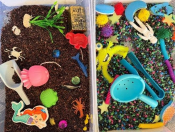
Build your own “FVA on the go” with these five steps
Step 1: Introduction
- Purpose: It’s a portable and versatile set of tools for evaluating areas of an FVA, focusing on ocular motility skills.
Step 2: Choose a theme
- Theme: It is important to have a theme or use objects that are engaging and relevant to the individual. It is also critical to consider the student’s age and interests when introducing the box.
- Examples: Space, under the sea, nature, numbers/letters, colors/shapes, and seasonal themes.
Step 3: Choose the bin
- Bin selection: The bin should be portable, durable, and organized.
- Size: Choose a bin that is compact yet spacious enough to hold all your items.
- Material: Opt for sturdy materials one you can clean easily and stay intact.
- Features: Consider bins with dividers if necessary! Or bins you can easily switch out objects to be more relevant to the current student.
Step 4: Select the objects
- Variety of objects: Choose objects that vary in color, size, and texture to assess different areas of the FVA.
- Collect objects that you already have, and get creative!
- Purchase from Amazon, The Dollar Store, Target, and other affordable retailers.
- Use a pair of tongs or big spoons for students to interact with the objects in other ways.
- Think bright colors, high contrast, and low contrast for assessment purposes.
- Line the bin or use black rice to enhance contrast with the items.
- Make objects using a Cricut, 3D printer, or in other creative ways.
- Colors: Include a spectrum of colors for color discrimination and visual tracking.
- Size: Provide objects in various sizes to assess visual acuity.
- Textures: Incorporate objects with different textures to engage tactile perception alongside visual skills.
- Types of objects:
- Cards with Patterns or Shapes: For visual discrimination and scanning.
- Movement Items: Small balls or items that can roll or bounce for tracking.
- Small toys or Figures: For close-up tracking.
Step 5: Set up the bin to be “FVA on the go”
- Pre-measure using the Pre-measure Guidelines (see below).
- Brainstorm activities using the “FVA on the go” Assessment Guidelines.
- Choose your preference on these guidelines- having them available on your computer or writing on them next to you while using the bin.
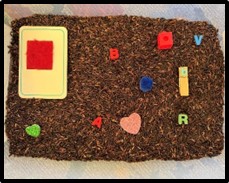
Pre-measure guidelines for the FVA on the go
These guidelines provide structure for assessing various aspects of functional vision while using the “FVA on the go” kit. The items within the kit offer flexibility to adapt assessments for different needs. Blank spaces are available for individual notes and adjustments.
FVA on the go guidelines: specific to areas of the FVA
When the student is exploring the box, you can take this opportunity to visually observe the student’s eyes. This is a good chance to document any physical abnormalities or behaviors that might signal a visual impairment.
Make it your own
Having these FVA on the go will elevate the stress of preparing for the assessment. They are easily adapted to meet the needs of individual students and create activities that motivate students to engage and try their best.
Read more about Functional Vision Assessments