By Bridget Braneff and Liz Eagan
In our 18+ program, I work closely with the para+ who is one of the teachers at this program, Bridget Braneff. A paraprofessional plus is a school employee who is supervised by a licensed teacher to support the learning and classroom activities. This is one activity we had discussed working on at the end of the school year. Together we created the activity using her knowledge of the students she works with and my experience at adapting materials.
Teaching students how to read, understand, and use a receipt is a powerful life skills lesson. It connects literacy, functional math, budgeting, and self-advocacy. When working with differently abled adult learners, the key to mastering this skill lies in scaffolding: breaking the receipt down into bite-sized, visual steps that progress naturally from simple identification to critical thinking.
We created a structured, 4-level framework for building receipt literacy in life skills or 18+ programs. We wanted to scaffold the learning of reading these receipts. We used receipts that had 5 or less items on them. We asked colleagues for assistance in obtaining receipts. We started the breaking down of the receipts for teaching this topic to students with special needs. Currently, none of our receipts have coupons listed on them. We’re working with coworkers to obtain a couple.
Reading store receipts and individuals with a visual impairment
Reading store receipts presents specific challenges for individuals with low vision or no vision due to smaller fonts, low contrast, shiny or thermal paper, and irregular visual layouts. Receipt layouts are not user friendly and frequently hard to read…even for those with no vision issues.
Optical tools can help low-vision students access receipts independently.
Portable handheld video magnifiers are compact enough to carry in a pocket or bag while shopping. With this tool, students can adjust color modes to cut down on the glare from glossy receipt paper. An illuminated handheld magnifier has a built in LED light that can provide illumination that brightens faint text printed on receipt paper. Pocket or keychain folding magnifiers, while small, are discreet and portable for community-based outing and real-world transactions.
One piece of technology that most individuals carry with them at all times is their phone. Smartphone apps use artificial intelligence and optical character recognition (OCR) to convert printed receipt text into spoken speech or high-contrast, scalable text.
Apps change frequently but here are a few examples:
- Seeing AI (iOS): This app features a dedicated “Short Text” mode that reads text aloud as soon as the camera sees it, and a “Document” mode that captures the full receipt, formats the layout, and reads the line items sequentially.
- Envision AI (iOS & Android): This app scans documents, extracts text, and speaks it aloud with customizable text size and contrast.
- Be My Eyes/Be My AI: This app uses GPT-4 vision technology to allow low-vision users to take a photo of a receipt and ask conversational questions like: “How much did the milk cost?” or “What is the total at the bottom?”
There is also a built-in feature that doesn’t need to be downloaded. Smartphones have built in magnifier tools. The iOS smartphones have a magnifier while the Android has a camera zoom. These are built-in tools allow users to zoom in, apply color filters (i.e., inverted colors, grayscale, high contrast), and turn on the flashlight to read receipt text clearly.
There is also wearable assistive technology. As a TVI, I am less familiar with this option. Former students have talked to me about their experiences with it. There are “smart glasses with OCR/AI”. These are compact devices that clip onto standard eye glass frames. The user points their finger at the receipt and the device reads the information directly into a small ear speaker. These is no need for a handheld phone or a screen!
Worksheets that can be used and adapted for each level:
Level 1: basic identification and orientation (the visuals)
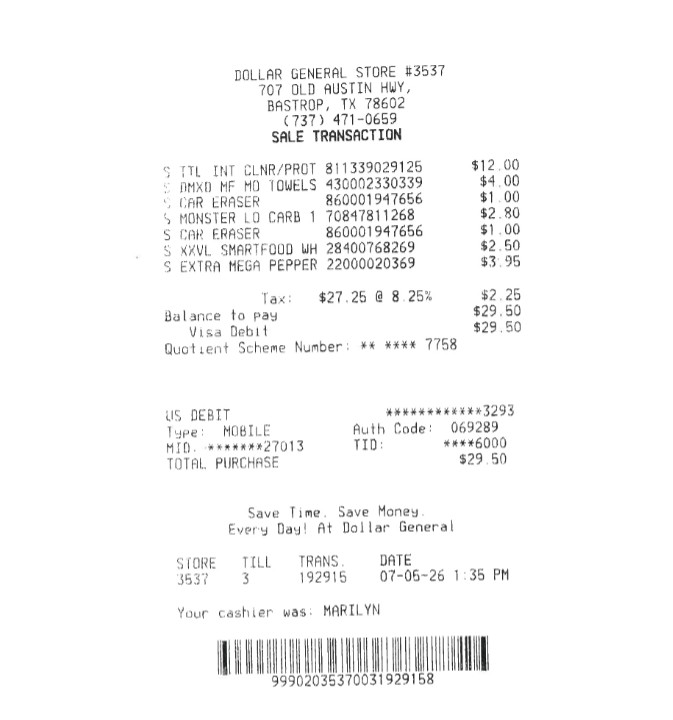
This foundational assessment activity is designed to establish essential visual literacy and document navigation skills before introducing functional math. By guiding students to locate critical information, such as store names, transaction dates, timestamps, dollar signs, and total amounts, the activity builds spatial awareness and visual discrimination on dense, unformatted retail receipts. Through targeted prompts involving text recognition, letter spotting, and spatial tracking (identifying top, middle, and bottom sections), students develop the baseline visual scanning abilities required for independent consumer navigation, budgeting, and real-world functional literacy.
One of our teaching tips would be to use highlighters to mark the receipt to code it. For example, have students use a green highlighter for the grand total, yellow for the store name, and blue for the date.
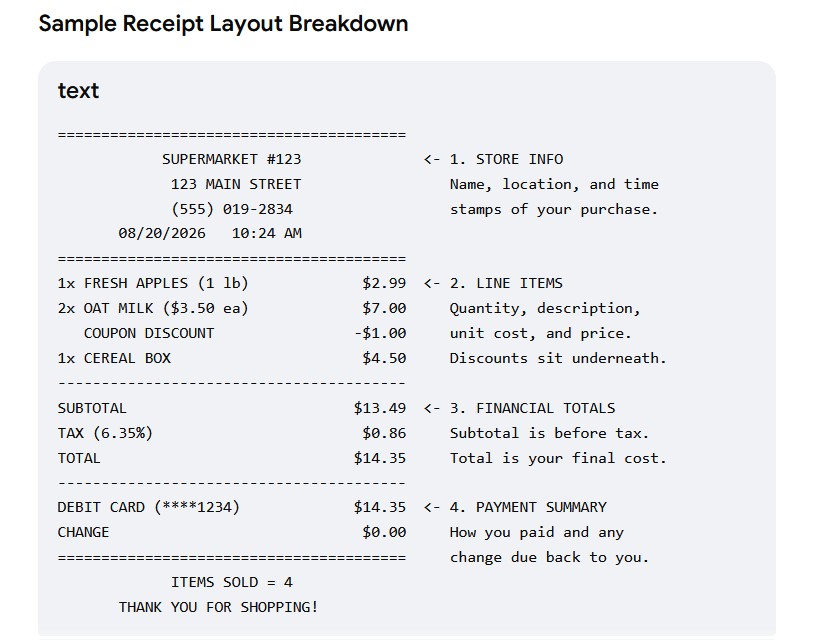
Sample receipt AI generated
Level 2: itemization and matching (reading the receipt)
This level is an instructional reading comprehension and functional literacy designed to bridge the gap between concrete physical objects and abstract printed text. By guiding students through line-by-line receipt analysis, this activity develops crucial visual discrimination and scanning skills required to verify transaction accuracy. Student’s practice identifying specific item descriptions, categorizing purchases, locating embedded discounts or coupons, decoding abbreviated store text, and evaluating comparative values such as highest and lowest prices. Ultimately, this foundational task strengthens real-world consumer awareness, supports functional vocabulary development, and fosters essential independent living skills for special education learners.
One of our teaching tips would be to pair real items with a receipt. Have students line up the items next to their corresponding line on the receipt to make the abstract text concrete. Make sure you have all the items on the receipt chosen to make this work effectively. You can always extend this activity to include “what’s this used for” discussion.
For an extension activity provided space to do so, would be to set up a mock store with a cash register. Students could practice making store purchases as well as learn how to stock shelves. Practice checking expiration dates, checking for damaged items, taking inventory of shelves, ‘facing’ the merchandise, sanitizing the sales counter, practice greeting ‘customers’, etc. are all activities that could be practiced before going out on different work sites.
Level 3: functional math and money concepts
This level provides targeted, real-world math instruction designed to build financial literacy and independence in transition-age and special education students. By bridging classroom arithmetic with daily consumer experiences, this activity guides learners through evaluating itemized costs, identifying key financial line items (this could include, subtotal, sales tax, and grand total) and applying practical payment strategies like the next dollar up method. Additionally, students analyze transaction data to verify payment methods and calculated change, transforming abstract mathematical operations into functional self-advocacy skills needed for everyday community living.
A teaching tip here would be to incorporate the “next-dollar up” strategy for students building functional money skills. Ask them: “If the Grand Total is $14.25, how many dollar bills do you need to hand the cashier?”
Level 4: problem solving and community living (critical thinking)
For the final level, we targeted practical consumer advocacy, expense management, and real-world problem solving for transition-age students preparing for independent living. By challenging students to analyze return policies, audit line items for billing errors, evaluate personal wallet funds, and locate store contact information, the activity bridges functional literacy with financial self-determination. Exercises requiring students to differentiate returnable goods, safeguard sensitive transaction records, and navigate store timeframes cultivate critical thinking skills essential for navigating everyday commercial transactions and advocating for oneself as an empowered consumer.
A teaching tip here would be to expand on the above by role playing returning an item. For example, “If you need to return these shoes because they don’t fit, how many days do you have? Where on the receipt does it tell you?” Most store receipts don’t have this information readily available on them. Teach the student how to learn to find the information.
Teaching receipt reading can transform a routine transaction into a moment of empowerment. By scaffolding this instruction across these four levels, moving from visual identification to active problem-solving, special education programs provide adult learners with the concrete tools they need to navigate stores confidently, protect their money, and to advocate for themselves in the community.
References
PNC Bank. (n.d.). Special needs lesson plans. Practical Money Skills.
Sequoia Financial Group. (2023, July 24). Teaching money skills to individuals with disabilities: Practical lifelong lessons.
TeachTown. (2023, June 14). Life skills in transition students.